Best Mechanical Keyboards for Work and Gaming in 2026
A good mechanical keyboard can make a shared desk feel more capable without forcing you to choose between office comfort and gaming performance. The right model should support long writing sessions, offer dependable key registration during play, and fit the way you actually use your computer. That usually means looking beyond RGB lighting and maximum polling rates. Layout, switch feel, noise, connectivity, software, and wrist position often matter more day to day.
What to Look for in a Work-and-Gaming Mechanical Keyboard
Start with the layout. A full-size keyboard includes a number pad, which is useful for spreadsheets, accounting, and frequent data entry, but it occupies more desk space. A tenkeyless, or TKL, model removes the number pad while preserving the function row and navigation keys. It is a strong compromise for gaming because it leaves more room for a mouse. Compact 75 percent and 65 percent layouts save even more space, although they may relocate or remove keys that office software users rely on.
Look for adjustable feet, a stable case, and a comfortable typing angle rather than assuming a heavier keyboard is automatically better. Keycap quality also affects long-term use. Double-shot or dye-sublimated legends tend to remain readable longer than inexpensive printed legends, while textured keycaps can make common gaming controls easier to identify by touch. A detachable USB cable makes transport and replacement simpler, and hot-swappable sockets allow switches to be changed without soldering.
Compatibility is another practical consideration. Windows support is common, but Mac users should check whether the keyboard offers clearly labeled shortcuts or easy remapping. A mechanical keyboard can work with a Dell desktop, a laptop, or a custom PC, but included software may not provide the same features on every operating system. If the keyboard will be used across two computers, a kvm setup or built-in device switching can be more useful than a long list of lighting effects.
Best Mechanical Keyboards for Mixed Use
For a mixed work-and-gaming setup, the strongest catalog choices usually fall into four categories: a full-size wired keyboard for maximum practicality, a TKL model for balanced desk space, a compact hot-swappable board for customization, and a wireless keyboard for flexible workstation layouts. These categories are more useful than simply choosing the most expensive option, because each solves a different problem.
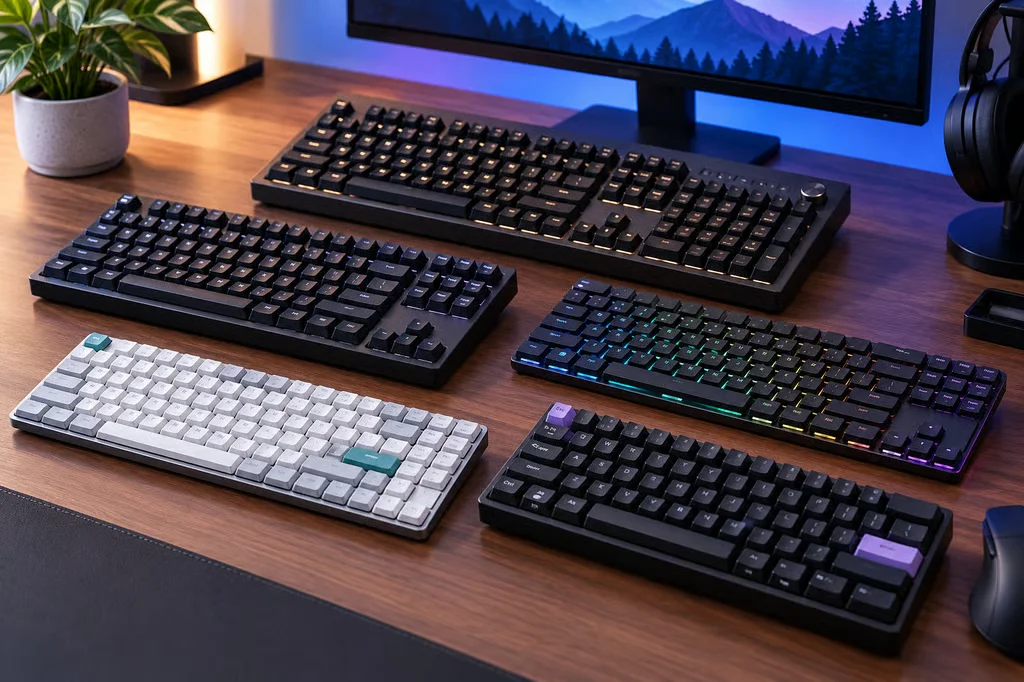
When comparing the four catalog picks later in the guide, weigh their pros and cons against your routine. A full-size model may offer the best number-pad access but leave less room for a mouse. A TKL keyboard can improve mouse clearance but may require a separate number pad. A compact board is portable and customizable, yet its missing or layered keys can slow spreadsheet work. A wireless model reduces cable clutter, although battery charging and connection management become part of ownership. No single design is best for every desk.
Full-size keyboards for office-heavy setups
Choose full-size if your work involves frequent numerical entry, finance software, or shortcuts that depend on dedicated navigation keys. It is also a sensible format for a permanent desktop where desk width is not limited. Check whether the number pad is positioned close enough to the main cluster to avoid excessive hand movement, and consider a separate wrist rest if the front edge of the case is tall.
TKL and compact keyboards for gaming space
TKL keyboards are often the easiest recommendation for people who switch between documents and games. They retain familiar navigation keys while creating more room for lower mouse sensitivity. Compact layouts are better suited to users who value portability, clean desk lines, or custom keymaps. Before buying one, confirm how to access Home, End, Insert, and function-row commands, especially if those keys are part of your work routine.
Switch Types, Noise Levels, and Typing Feel
Linear switches move smoothly from top to bottom without a tactile bump. They are popular for gaming because repeated presses feel consistent, but some users find them less informative for fast typing. Tactile switches provide a noticeable bump that signals the actuation point. They can suit mixed use particularly well because the feedback helps with touch typing, although the bump may feel tiring if you prefer a very smooth keypress. Clicky switches add a separate click sound and offer the most pronounced feedback, but they are usually the riskiest choice for shared offices, video calls, or quiet households.
Switch force matters as much as switch type. Lighter springs can feel quick but may lead to accidental presses for some typists. Heavier springs can reduce unintended inputs but may become tiring during long documents. Sound also depends on the case, keycaps, stabilizers, desk surface, and whether the switch bottoms out. A dampened linear switch may be quieter than an ordinary tactile switch, while foam and silicone inside the case can reduce resonance without changing the basic switch character.
Recommended products
Use these catalog picks as a shortlist for best mechanical keyboards for work and gaming in 2026. Compare measurements, materials, and return terms side by side instead of buying from a photo alone.


Do not confuse a low-profile board with an ultrathin bluetooth keyboard. An ultrathin bluetooth keyboard is generally designed around portability and laptop-like convenience, while many low-profile mechanical keyboards still provide mechanical switches, replaceable keycaps, and a more substantial typing feel. If quietness is essential, test the return key and space bar in particular; large stabilized keys often create more noise than the letter keys.
Wired vs. Wireless Connectivity
Wired keyboards remain the simplest choice for a fixed gaming station. They do not need charging, avoid wireless interference, and generally provide a straightforward connection for firmware updates and configuration. A removable cable is preferable to a permanently attached one, especially if you move the keyboard between a desktop and a laptop.
Wireless models can be more convenient for workspaces shared with a tablet, laptop, or multiple computers. Bluetooth is useful for low-power everyday connections, while a 2.4 GHz USB receiver is typically the better option when consistent gaming responsiveness is the priority. The best multi-device keyboards make switching obvious with dedicated buttons or a clear key combination. Check whether the keyboard can charge and operate over USB at the same time, and confirm that the receiver can be stored in the case for travel.
A keyboard-mounted Desk Mount is not a standard feature, but the phrase can refer to a setup where the keyboard is used with a monitor arm, tray, or adjustable desk accessory. In those arrangements, weight, cable routing, and the keyboard’s bottom feet become especially important. Make sure the mounting surface supports the board securely and does not press against the cable connector.
Features That Improve Productivity and Gaming
Hot-swappable switches are valuable if you are still deciding between linear and tactile typing. Per-key remapping can turn an underused key into a shortcut for window management, media control, or a frequently used application command. Dedicated media controls are convenient during meetings and play, while a volume wheel is usually faster to use than a secondary function layer. N-key rollover and reliable anti-ghosting help ensure that simultaneous inputs register correctly, but they should not outweigh comfort and build quality.
Lighting is most useful when it improves visibility or identifies a custom control layer. Adjustable brightness is more practical than permanently bright effects, especially in a shared room. Macro support can help with repetitive desktop tasks, but check the software’s privacy, background-process, and operating-system requirements before relying on it for work. If you prefer a simple setup, keyboards from mainstream computer brands such as Dell may be easier to support than highly specialized enthusiast boards, while accessories from names such as AmazonBasics or Fintie may help complete a budget desk without determining which mechanical keyboard is the right fit.
How to Choose the Right Keyboard for Your Desk
Choose a full-size tactile keyboard if office work and numerical entry dominate, a TKL board if gaming space and familiar navigation keys matter equally, or a compact hot-swappable model if customization and portability are priorities. Select wireless when a cleaner desk or multiple devices justifies battery management; choose wired when simplicity and uninterrupted gaming are more important. Finally, judge the keyboard from your actual environment. A switch that sounds acceptable alone may be distracting in a shared room, and a compact layout that looks elegant may slow down the work you do every day.
FAQ: Best Mechanical Keyboards for Work and Gaming in 2026
What is the best mechanical keyboard for both work and gaming?+
The best choice balances comfortable typing, responsive switches, reliable connectivity, and useful productivity features. Look for a full-size or tenkeyless layout that suits your desk, with hot-swappable switches if you want to customize the typing feel later.
Which mechanical keyboard switches are best for work and gaming?+
Tactile switches are a versatile option because they provide noticeable feedback for typing without requiring a loud click. Linear switches feel smooth and are popular for fast-paced gaming, while clicky switches offer a distinct sound and sharp feedback but may be distracting in shared workspaces.
Are wireless mechanical keyboards good for gaming and office work?+
Yes, modern wireless keyboards can work well for both uses when they offer a stable 2.4 GHz connection, Bluetooth, and dependable battery life. Wired keyboards avoid charging and pairing concerns, while multi-device wireless models are more convenient for switching between a work computer and a gaming setup.
What keyboard size is best for work and gaming?+
A tenkeyless keyboard is a strong all-purpose choice because it keeps the function row and arrow keys while leaving more room for mouse movement. Choose a full-size model if you regularly use a number pad, or a 75% layout if you want a compact design without losing dedicated arrow keys.
What features should I look for in a work-and-gaming mechanical keyboard?+
Prioritize comfortable keycaps, adjustable feet, reliable rollover, and low-latency input for gaming. Hot-swappable switches, programmable keys, onboard profiles, backlighting, and a detachable USB cable can also make one keyboard easier to use across work and gaming.